

Background of the Plan
What Is an IP Mesh Radio and How Does It Work?
2025-10-24


Background of the Plan
With the advancement of clinical informatization, hospitals are gradually achieving paperless, filmless and wireless operations. With the continuous maturation and popularization of wireless local area network technology, the application of wireless local area networks in the global medical industry has become a trend. As a supplement to the wired local area network in hospitals, wireless local area networks effectively overcome the drawbacks of wired networks. By using tablet wireless computers and mobile carts, vital sign data collection, query and entry of medical staff data, doctor rounds, bedside care, call communication, patient identification code recognition, etc. can be carried out anytime and anywhere. This fully utilizes the efficiency of the medical information system and highlights the technical advantages of digital hospitals. At the same time, the complete wireless coverage can also improve patients' satisfaction with hospital services.

Demand analysis
The demand analysis for hospital wireless coverage is as follows:
1. It is necessary to ensure full wireless coverage in all areas, including the registration area, outpatient department and inpatient department, etc;
2. There is a high level of mobility among people, and it is necessary to ensure that wireless terminals can automatically switch to a new access point during movement, maintaining uninterrupted services, that is, wireless roaming;
3. The terminal distribution is uneven, and it is necessary to meet the requirements of automatic load balancing to ensure the performance of the wireless network;
4. The wireless network is mainly used for internal office work of doctors and for patients to access the internet. The access points (APs) need to support the setting of multiple SSIDs, and different SSIDs should have different network permissions;
5. High requirements for wireless security, especially for office networks, necessitate identity authentication and the restriction of unauthorized terminals from accessing the network. For example, MAC address authentication can be adopted;
6. The AP should have an elegant and stylish appearance, and it must support PoE power supply to meet the requirements of fire protection and wiring;
7. AP supports unified management and configuration, and can monitor the working status of each AP in real time. The operation and maintenance is very simple;
Project design
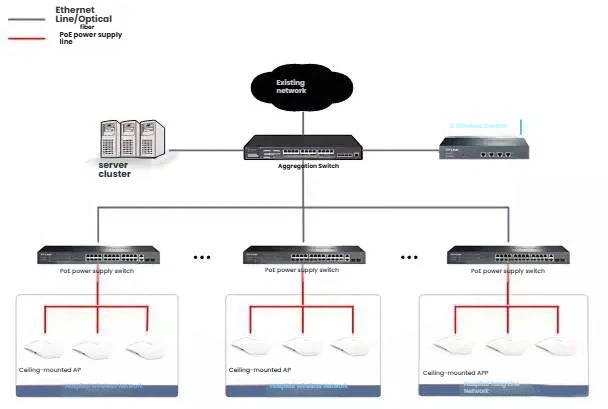
Topology of networks
Installation and Deployment
The environment at the hospital registration desk is generally relatively spacious with fewer obstructions. Ceiling-mounted APs can cover a diameter of 20-30 meters in such an open space. The number of units to be used can be determined based on the scale, and the distribution of the points should be evenly spaced. As shown in the figure below:
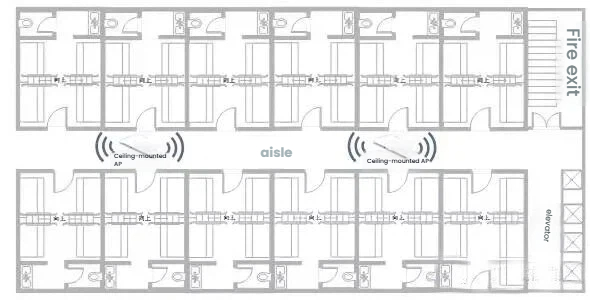
Registration Counter Layout
The structure of the outpatient department and the inpatient department is quite similar. Ceiling-mounted APs can be installed in the corridors, with a coverage area of approximately 10-12 meters in radius. The number of units to be used can be determined based on the actual environment. As shown in the following figure:
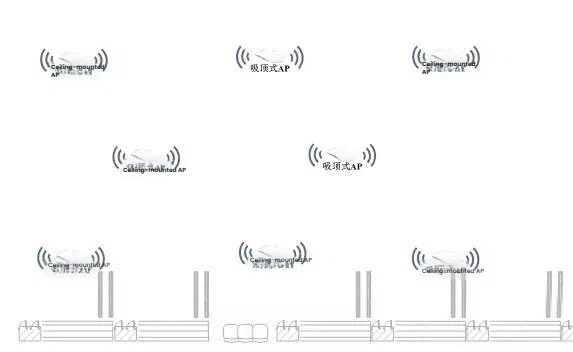
Layout of the outpatient and inpatient buildings' APs
Features of the plan
The solution uses commercial wireless products to achieve coverage and is deployed using the wireless controller AC and FIT AP methods. It has the following features:
High availability: The AP uses professional antennas and the transmission power can be adjusted linearly. It can be reasonably adjusted according to the actual environment to ensure the coverage requirements for different areas.
Flexible roaming: The FIT AP wireless deployment architecture allows different APs to broadcast the same SSID. When wireless terminals move between different APs within the same VLAN, they can quickly switch between APs and achieve cross-AP Layer 2 fast roaming.
High reliability: The FIT AP solution is adopted, supporting load balancing. The AC can dynamically adjust the even distribution of users among different APs, preventing any single AP from being overloaded.
High scalability: Supports various user access authentication methods such as MAC authentication and Portal authentication. It can be combined with external Portal servers and authentication servers to implement multiple authentication methods including SMS authentication, WeChat authentication, etc.
Easy to deploy: The AP adopts the 86-type panel design, which is elegant and stylish. It supports 802.3af standard PoE network cable power supply and can directly replace the original network panel without the need for re-wiring. It does not damage the original decoration of the room and the construction is simple.
Manageability: The FTT AP is uniformly managed by the wireless controller AC. It automatically discovers and uniformly manages the APs, allowing for real-time monitoring of the APs' operating status, facilitating network management and maintenance.
Equipment selection
To establish a stable and practical wireless network, it is necessary to select appropriate networking equipment. The complete solution for a wireless network includes routers, switches, PoE devices, APs, AC controllers, etc. Due to differences in scale and requirements, the equipment needed in different hospital network solutions may also vary. This requires a diverse range of network equipment to meet differentiated needs.
When selecting an AP for wireless coverage, the following factors should be taken into consideration:
Environmental characteristics: Outdoor or indoor, with sparse terminal distribution (such as in warehouses) or high-density wireless access (such as in meeting rooms, multi-function halls, etc.).
Installation method: Ceiling-mounted, panel-mounted or 86-pin box-mounted.
Power supply method: Standard PoE (802.3af or 802.3at), Passive PoE or DC (direct current power supply).
Coverage scope: single room, multiple rooms, area coverage, fixed-point coverage, etc.
Bandwidth capacity: Each AP can connect 10, 20, 30 or 50 terminals.
Take the hotel environment as an example. Different products can be used in different areas:
For the general guest rooms, ordinary ceiling-mounted wireless APs are selected, which can provide wireless coverage for most areas. A few wireless blind spots are allowed to exist appropriately. For the luxurious guest rooms and other high-end guest areas, panel-type wireless APs are used to ensure the best wireless coverage effect and provide the best accommodation experience. In densely populated areas such as dining areas and meeting rooms, ceiling-mounted dual-band wireless APs that support high-density access are adopted to meet the demand for simultaneous multi-user access.

Should AP choose 2.4G single-frequency or 2.4G/5G dual-frequency?
Based on the current available terminal products on the market, smartphones with a price of around 1,000 yuan can generally support 5G frequency band WiFi. Therefore, for a better wireless experience, we recommend dual-band wireless APs, especially in densely populated areas.
How many clients is an appropriate number for a wireless AP?
Based on the working principle of wireless products and the wireless transmission and reception capabilities of wireless terminals such as mobile phones, a wireless AP alone cannot achieve the goal of "covering an area of 1 kilometer and allowing hundreds of people to access it", which is impossible to realize.
Based on our experience, we recommend one single-frequency AP for 25 clients, and one dual-frequency AP for 50 clients.根据我们的经验,推荐一个单频AP带25个客户端,一个双频AP带50个客户端。
What is an appropriate coverage area for a wireless AP?
The coverage range of the wireless AP is highly dependent on the installation location and the actual environment. The following information is provided for reference:
Ceiling-mounted wireless AP: Covers 6 surrounding rooms/dormitories or an area within a radius of about 12 meters. Suitable for installation in relatively spacious environments with a ceiling height of no less than 3 meters. Due to the characteristics of the installation method, it is prone to creating wireless dead zones.
Panel wireless AP: Covers 2 adjacent rooms or dormitories, as well as the space behind 1-2 walls. The wireless coverage is quite good.
How to choose the appropriate PoE switch?
The PoE switch serves as both a power supply device (PSE) and an access switch. When choosing a PoE switch, the following aspects should be considered:
1. Physical port
PoE switches are generally used to connect power-receiving terminals and are employed as access switches. The number of PoE power supply ports supported by the switch should be determined based on the number of power-receiving terminal devices. Additionally, the highest supported port speed needs to be considered according to the power-receiving terminals and business requirements. For example, if the port of an AP is gigabit and uses 11AC or dual-band, then a gigabit access solution can be considered.
2. Power supply parameter
Select the appropriate switch based on the power supply protocol supported by the power receiving terminal (AP or IPC), such as 802.3af, 802.3at or non-standard PoE. The PoE power supply protocol supported by the switch needs to be consistent with that of the power receiving terminal.
3. Manageability Design Goals
PoE switches are divided into network management PoE switches and basic PoE switches. The basic PoE switch mainly provides PoE power supply ports and can be used directly without configuration. The network management PoE switch, in addition to providing PoE power supply, can also flexibly configure the power supply time and priority of the ports, and can specify a more reasonable power supply plan.
4. Commonly used function
The 802.1Q VLAN function is a commonly used VLAN division function in local area networks, which can divide multiple isolated virtual local area networks. DHCP listening can prevent the access of other DHCP servers from affecting the local area network. Port isolation can isolate the communication between different ports. When choosing a product, you can select a PoE switch that supports the above functions according to your needs.
How to choose the appropriate switch?
The switch, as the core device for data forwarding in a local area network, its performance and functions determine the manageability and data forwarding performance of the local area network. When choosing a switch, the following aspects should be considered:
1. Is the switch manageable?
Switches are classified into managed switches and basic switches. Basic switches mainly expand the number of ports and can be plugged in and used directly without configuration; managed switches, on the other hand, offer a wide range of management functions such as VLAN division, port security, and rate management.
2. Physical port
The number of physical ports supported by the switch determines the number of terminals or secondary devices that the switch can connect to. This needs to be selected based on actual requirements, and of course, future network expansion should also be taken into consideration. The access ports of the switch are used to connect internal network terminals, while the uplink ports are used to connect superior devices. Different port types need to support the highest speed of either 100 Mbps or 1000 Mbps.
3. Special port
If the access terminal is a PoE device, it is necessary to consider whether the switch ports need to support PoE power supply; for long-distance transmission, it is necessary to consider supporting fiber optic interfaces, etc.
4. Function support
Dividing VLANs ensures that ports belonging to different VLANs cannot communicate with each other; setting static routes enables VLANs in different network segments to communicate with each other; DHCP listening prevents the access of other DHCP servers from affecting the local area network; all of these functions are commonly used in medium and large-sized local area networks.
5. Other characteristics
Access control, 802.1X authentication, loopback detection, quadtree binding, IGMP Snooping, etc.
I won't give any examples for the switch. This is something everyone is already very familiar with.
How to choose the right router?
As the Internet exit point of the entire local area network, the router determines the performance, applications and security of the entire network. When choosing a router, the following aspects should be considered:
1. Usage occasion
Currently, there are enterprise routers, internet cafe routers, and home routers, etc. Please choose the appropriate type according to the usage occasion.
2. Wireless function
Whether the router supports wireless function? Please select the appropriate router according to the type of terminal you are connecting (desktop computer, laptop, mobile phone, etc.).
3. Carrying capacity
The capacity of different routers varies. When setting up the network, it is necessary to select the appropriate model based on the number of terminals that need to be connected to the network. This should be done while reducing costs and ensuring that the network can operate normally and efficiently.
4. Number and rate of WAN interfaces
Different types of routers support varying numbers and speeds of WAN ports. The number of WAN ports ranges from 1 to 4, and the WAN port speeds can be either 10/100M or 10/100M/1000M. Please select the appropriate model based on the actual broadband line situation in your environment.
5. Authentication function
The support for authentication methods such as PPPoE server, web authentication, and WeChat authentication varies across different router models. Therefore, you need to select the appropriate router based on your network access authentication requirements.
6. Other application functions
Supported VPN types include: IPSec VPN, PPTP VPN, L2TP VPN. Supported ways of internet behavior management include: application restrictions, URL filtering, etc.
7. Expansibility
Any network is not static. When choosing the current network equipment, you need to consider the network scale in the short and medium term, the expansion needs of the applications, and combine the requirements of subsequent planning to select the appropriate equipment. (The article is from Tu'qian, copyright belongs to the original author. If there is any infringement, please contact for deletion.)
Dongguan Tuqian Technology Co., Ltd.is a high-tech product research and development enterprise. The company responds to market demands and has developed wireless transmission products suitable for various environments, providing wireless transmission solutions for them. The company integrates the research, production and sales of wireless transmission equipment, and has a professional installation service team and a customer service department. Our main products, such as mobile video wireless transmission equipment, 3G/4G wireless transmission equipment, and digital bridge wireless transmission equipment, accept special customization requirements from customers. We serve hundreds of large and medium-sized enterprises in China; the ultimate wireless transmission solution is applied in dozens of countries and regions around the world. We adhere to the customer-centered approach and the spirit of striving, continuously innovate based on customer needs, and have won the respect and trust of customers. Based in Shenzhen, we look forward to the global market.