

IP Mesh vs Traditional Wireless Network: What’s the Difference?
2025-10-28


With the widespread use of online video surveillance, nowadays it is mostly high-definition online surveillance systems. What we discuss every day are all related to security surveillance matters. Moreover, people have gradually realized that as the application of wireless bridge in the transmission system, it is becoming increasingly widespread. From elevator surveillance to forest fire prevention surveillance, it can be seen everywhere.
In practical applications, various problems are inevitable. Some are related to software settings, while others are related to hardware installation. Therefore, today, based on my own construction experience, I will share with you some information about the installation of wireless bridge construction!
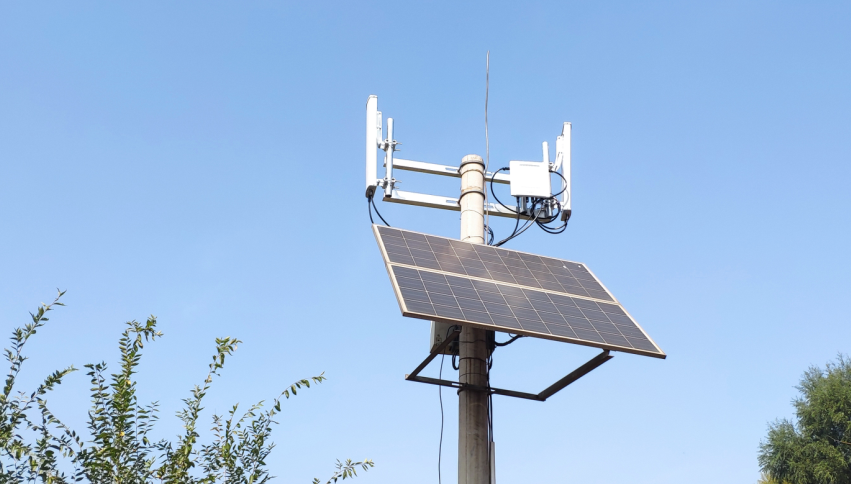
Since all the wireless bridge devices are powered by POE, it is extremely important to correctly connect the POE power supply box, wireless bridge, IP camera, etc. The wireless bridge devices all adopt outdoor waterproof and dustproof designs, and appropriate waterproof and dustproof measures should be taken at the network cable connection points.
1. Take measures to prevent rain and dust, and ensure insulation.
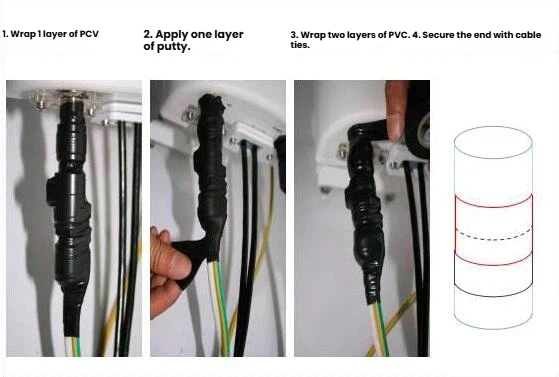
The wire connections for wireless bridges, POE, and network cameras need to be protected against rain and dust. The connection points between the wire and the wireless bridge usually require two to three layers of waterproof tape to be wrapped around them, and the crystal connectors should be kept hidden as much as possible. The connection points between the wire and the network camera also need to be wrapped with two to three layers of waterproof tape or insulating tape. All power connection points should be insulated as much as possible.
2. Installation and fixation of wireless bridge equipment.
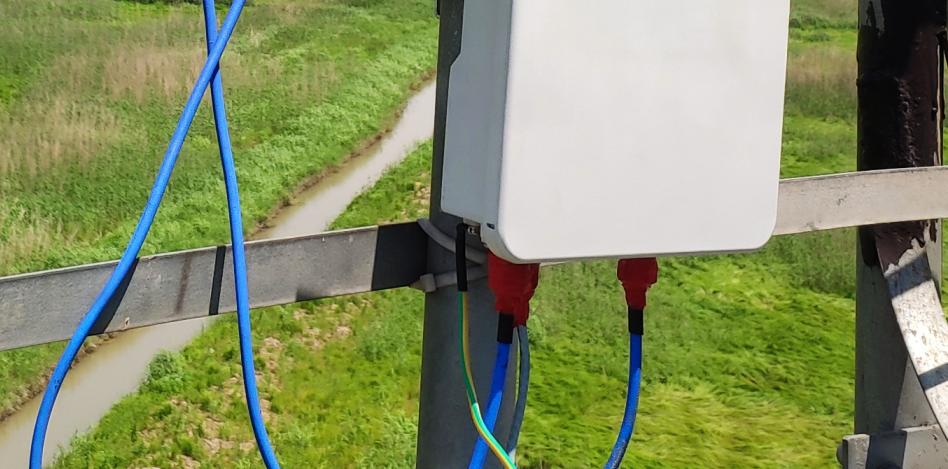
When installing the wireless bridge, it is essential to secure the bracket properly. If the bracket is unstable, it will directly affect the stability of microwave signal transmission. When fixing the wireless bridge onto the bracket, follow the fixing method shown in the figure to ensure a firm attachment. During the installation process, since the surface of the bracket is relatively smooth, if you directly tighten the U-shaped clamp with a nut, over time, the outdoor rainwater may penetrate the surface of the bracket and cause rust, and the contact between the U-shaped clamp and the bracket will become loose. During installation, it is necessary to place an elastic ring on the bracket to ensure a tight contact between the U-shaped clamp and the bracket.
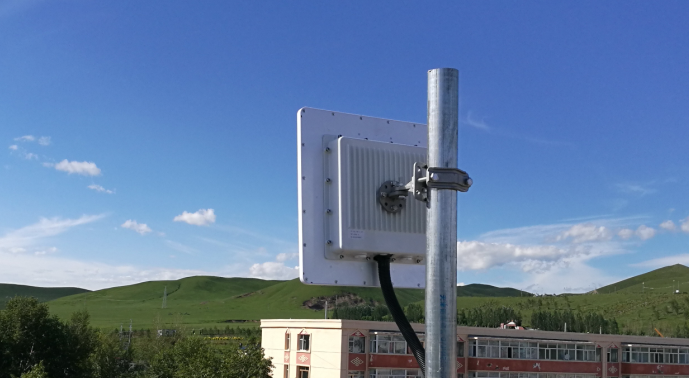
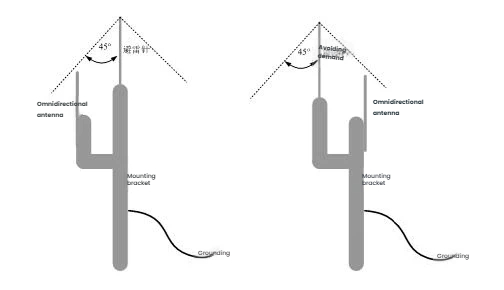
During installation, the antenna of the device needs to be aligned properly to ensure high sensitivity in receiving signals and stable transmission signals. As shown in the following picture:
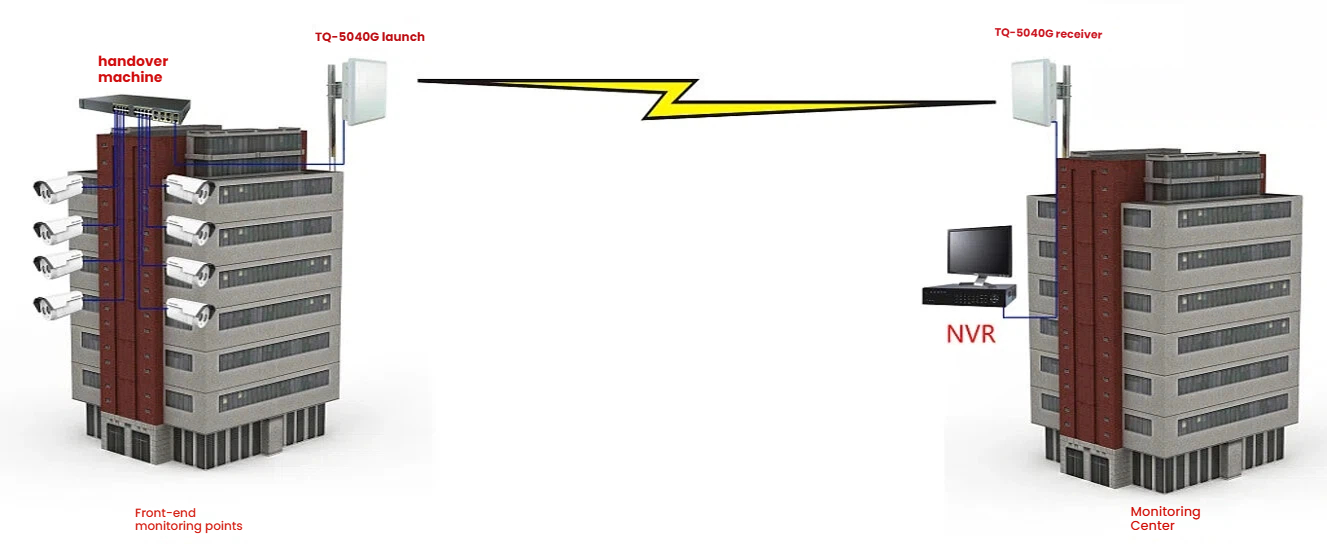
3. Control of Network Cables and Lengths.
If you want to increase the distance between the wireless bridge and the power box or switch. There are two types of network cables available for selection: CAT5e (ultra-5) or CAT6 (ultra-6). Since the wireless bridge uses POE for power supply, the network cable not only transmits data but also supplies power to the wireless bridge. Therefore, if the network cable is too long or of poor quality, it will cause significant attenuation. The connection part between the wireless bridge and POE should use CAT5e or higher (try to choose brand network cables), and the length should be controlled within 25 meters.
Note: When using CAT5e or CAT6 cables to transmit data over a distance of 100 meters, it means that the distance from the LAN port of the POE power supply box to the camera or switch is 100 meters. However, due to different on-site environments, the POE power supply box may be installed in a distribution box located far from the monitoring center or the computer room. In such cases, it is advisable to use optical fiber transmission from the POE power supply box to the monitoring center or the computer room.
The network cables connecting the wireless bridge and the POE device should not be too long. It is recommended to use CAT5e or CAT6 cables, and the length should not exceed 25 meters to avoid insufficient power supply. For the connection part of POE to network cameras, switches, NVRs and other devices, the length should not exceed 100 meters to prevent network signal attenuation.
When the data transmission port of POE is located far away from the monitoring center or equipment in the computer room (more than 100 meters), it is recommended to use optical fiber transmission.
Currently, the two main types of POE recommended for use are: one is the modular POE that receives external DC power input, and the other is the regulated POE that integrates a transformer internally and uses an input of 220V AC voltage (as shown in Figure 3). Special attention: regardless of which type of POE is used, the interface definitions are uniform. The network port marked with "DATA IN" on the POE can be connected to network cameras, switches, computers and other network devices, while the network port marked with "P + DATA OUT" must be connected to wireless bridge equipment. When connecting, be careful not to make a wrong connection and avoid damaging the equipment.
4. Correct connections of network devices such as wireless bridges, POE power supply boxes, network cameras or switches.
The POE power supply box usually has three interfaces: a power input interface (generally a DC input), a POE network port (only used for connecting the RJ45 port of wireless bridge devices), and a network port or LAN port (can be connected to any network device based on the Ethernet port, such as: network cameras, switches, routers, computers, NVRs, etc.).
5. Network cable manufacturing standards and type selection.
The current standard for making network cables is generally based on the definitions of national standards. It is recommended to use the mainstream T568B wiring standard for making network cables. The standard is as follows: T568B: White Orange, Orange, White Green, Blue, White Blue, Green, White Brown, Brown
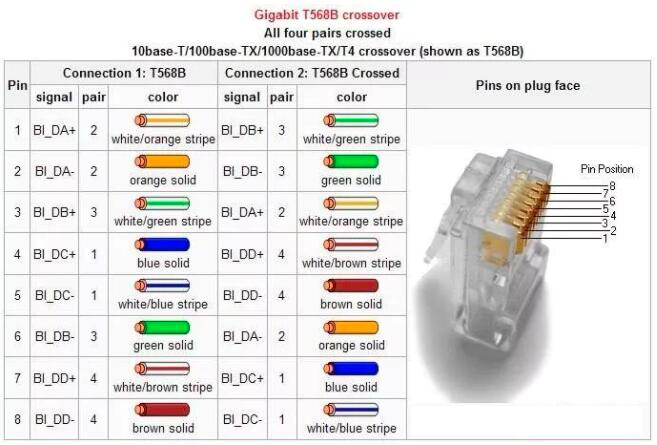
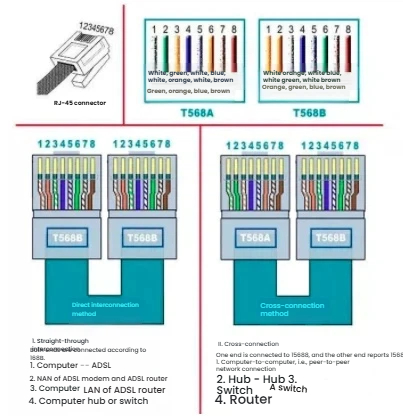
The wireless bridge equipment is powered by POE. It is recommended to use the standard T568B wiring sequence for the network cables. Since all network devices have adaptive Ethernet ports, when connecting the wireless bridge equipment to POE or connecting the POE to the switch, it is strongly recommended to use straight-through cables (i.e., both ends of the network cable have the standard T568B wiring sequence).
6. Lightning protection treatment.
Wireless bridge devices are usually installed in outdoor open areas and need to be protected against lightning. The devices themselves have the correct IP addresses for planning the wireless bridge. The wireless transmission system formed by using wireless bridges will use a large number of IP addresses. To avoid conflicts between the IP addresses of the wireless bridge devices and those of other devices in the local area network, there are mainly two solutions: First, separate into independent networks. Separate the wireless transmission network formed by the wireless bridge from other networks (such as office networks, server networks), and use a separate core switch for it. Second, re-plan the device IP addresses. Divide the IP addresses of the wireless bridge devices and network cameras, and hard disk recorders into different network segments.
7. Handling of feeder connector.
For outdoor high-power bridge equipment, since the transmission distance is long, an external antenna needs to be installed. The antenna and the equipment need to be connected using a feeder. At this time, all the connection points between the feeder and the equipment and the antenna must be protected against rain and dust. Two to three layers of waterproof or insulating tape should be wrapped around the feeder connection points. It is best not to leave the feeder connection points exposed to the air.