

What Is an IP Mesh Radio and How Does It Work?
2025-10-24


1. Interference of wireless signals
Since the wireless radio frequency of the wireless local area network uses the ISM (Industrial, Scientific, Medical) wireless frequency band, among which the 802.11b to 802.11n standards use the 2.4G frequency band, and the 802.11a standard uses the 5.8G frequency band, the wireless local area network will be affected due to some sudden radio frequency interference from wireless devices of the same frequency band in the actual operating environment. For example, microwave ovens and Bluetooth mobile phone signals are all in the 2.4G frequency band.
So when working in a wireless local area network, if a microwave oven is suddenly turned on within its area, or a Bluetooth phone uses a Bluetooth headset, or there is suddenly another wireless device operating in the same frequency band, all these will interfere with the wireless signals of the wireless local area network. The physical environment of the wireless network changes, such as the sudden appearance of large obstacles between the wireless AP and the wireless client, etc. This will directly cause a sudden significant decrease in the network performance of the wireless local area network, and directly result in the interruption of the wireless signal or a reduction in the data rate.
Another interference source comes from the wireless local area network itself, which is the interference from different channels within the same frequency band. This interesting situation occurs in home users, and it can only happen when wireless APs in adjacent or nearby buildings interfere with each other. Interference-free different channels should be used between adjacent wireless AP devices. For example: 802.11b and 802.11g can eliminate interference by using channels that differ by five frequency bands. The typical setting of non-interference channels is 1, 6, and 11 channels.
2. Wireless signal coverage and penetration
In a home environment, the distances are relatively short. Most wireless local area network devices claim to have a transmission range of over 100 meters. Therefore, the transmission distance of the signal is not an issue. However, the home environment brings a new problem - the spaces are relatively crowded and not very spacious. Among them, the walls in the rooms are the main obstacles. Since wireless local area networks use the wireless microwave frequency band. The most significant feature of microwaves is that they propagate almost in a straight line and have very weak diffraction ability. Therefore, the wireless receiving devices located behind the obstacles will receive very weak signals or no signals at all.
And about penetration? This is the question that many netizens are most concerned about. Everyone hopes that the wireless signal can at least penetrate the interior walls of the house. To enhance the ability of wireless signal to penetrate through walls, an effective method is to increase the gain of the antenna. When purchasing a wireless AP, it is best to choose a product with a high antenna gain. Generally, at least 2dBi is preferred. According to experience, an antenna with a gain of 2dbi can penetrate two walls. If there are many rooms and the number of walls to pass through is large, it is best to have equipment with detachable antennas so that high-gain antennas can be configured, such as replacing with a 5dBi omnidirectional antenna to enhance it.
Metal objects act as obstacles, not only blocking microwave wireless signals, but also absorbing the electromagnetic energy and generating weak currents that leak out. Therefore, the largest metal object obstacle in a home environment that blocks wireless signals is the floor with a steel mesh inside. In this direction, there is almost no possibility for the signal to penetrate. To penetrate, the signal would be extremely weak. For such a large-sized obstacle, microwave diffraction is even impossible. If the antenna of the antenna equipment is placed in the center of the room, the wireless signal can only be emitted directly from the open path through the window.
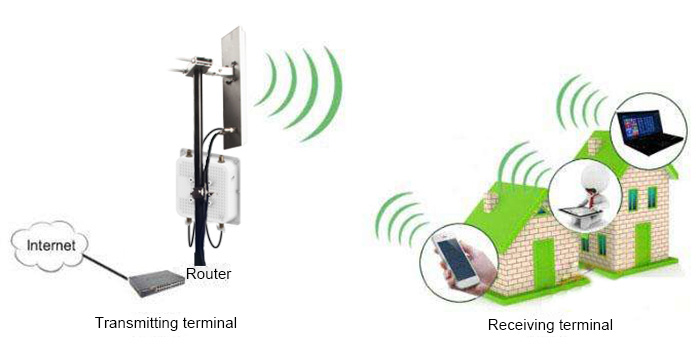
Wireless AP (Access Point) is a wireless switch used in wireless networks and is the core of the wireless network. It serves as the access point for mobile computer users to enter the wired network. It is mainly used in broadband households, building interiors, and campus interiors. The typical coverage distance ranges from several tens of meters to several hundred meters. Currently, the main technology is the 802.11 series. Most wireless APs also have an access point client mode (APclient), which can be wirelessly connected to other APs to extend the network coverage.
3. The performance of wireless local area networks
With the rapid development of wireless local area networks, users have been running more and more critical applications on wireless local area networks. As a result, many common high-bandwidth-consuming applications such as video applications now require wireless local area networks to provide higher bandwidth in order to achieve high-quality performance. We know that wireless AP devices are "wireless sharers". They jointly connect to wireless client devices and operate with Ethernet's CSMA/CD (Carrier Sense Multiple Access/CDMA - Carrier Sense Multiple Access with Collision Detection). To put it simply, it is a "shared" network, similar to the network hub of the past, but it has abandoned the cables of the hub and adopted wireless instead.